
Hi! I’m Nairobi :)

UI/UX Design Student

I am a dedicated and curious student passionate about product and web design, particularly on what drives a human to one design over another.

Case Study: Budget Bud

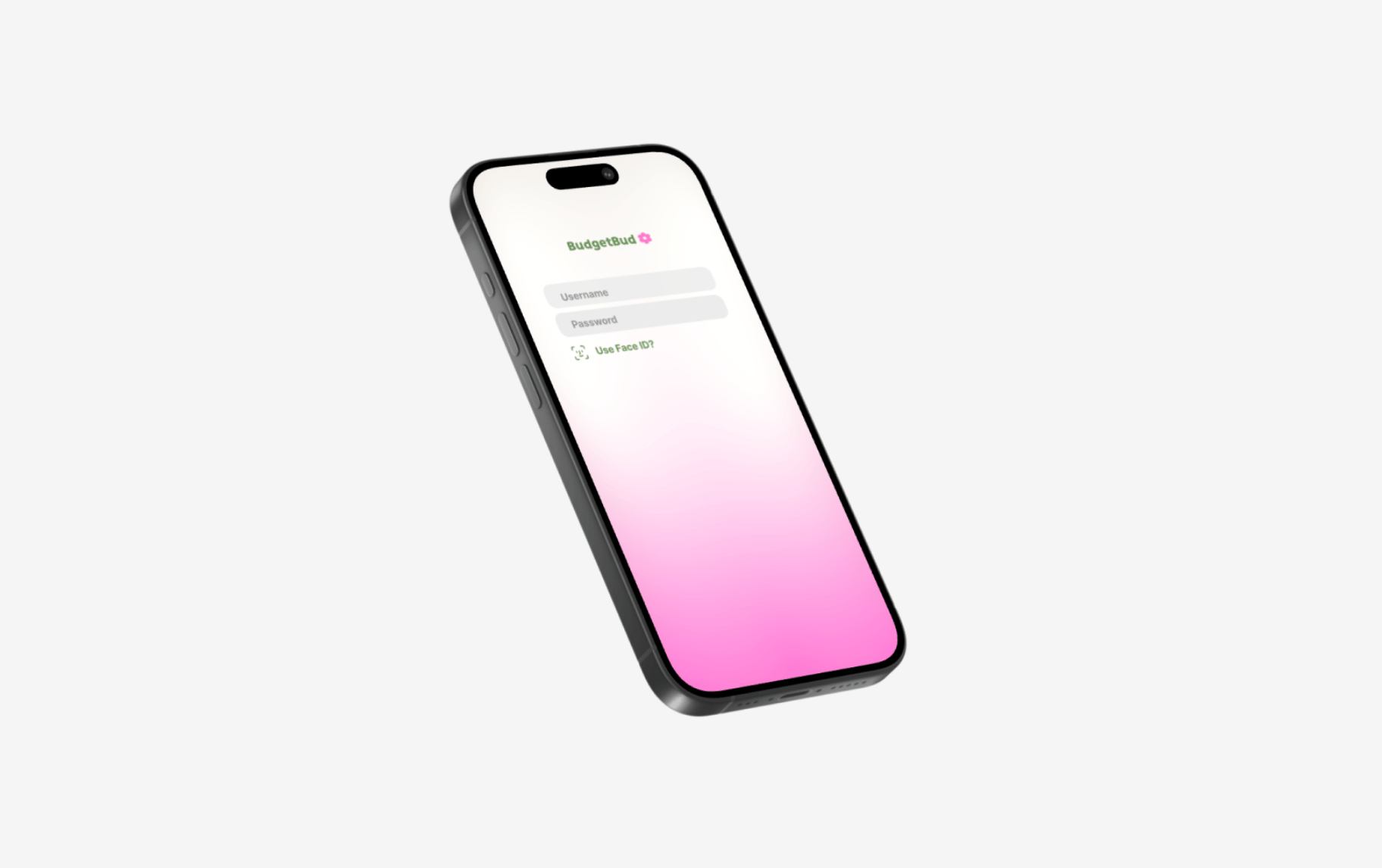
For the Spring 2026 UX Design Process course, I came up with an app called Budget Bud, which is to help build financial confidence for young college students who are just starting to manage their own money, or need a smoother digital experience to do so.

UX Design Process - CTEC 3323

2026

nac6200@mavs.uta.edu

email

resume link

resume

April 2026

Case Study Overview

Nairobi Canchola

An illustrative sketch of a flower

The Problem

For undergraduate students, academic and social pressures are often compounded by the "invisible" burden of financial management. This project addresses the cognitive overload of the average student by integrating budgeting into their daily or weekly habits. The goal is to transform a notorious pain point—financial anxiety—into a manageable, low-friction habit that accounts for diverse needs, including disability-related constraints. This app is designed to meet students where they are. Providing a centralized, accessible system that simplifies budgeting to help mitigate the overwhelmed state of the modern college student.

The Solution

To solve this issue, I served as both the researcher and designer of this app. During my research (which consisted of interviews with other college students), I found that the issue is not because students aren’t capable of being financially healthy, but because the budgeting apps we currently have need many changes to actually fit the lifestyles of each busy and unique student. This matters because students will get adjusted to make smarter and more careful decisions when dealing with their money if they have a pleasant and clear visual of where their paychecks are going.

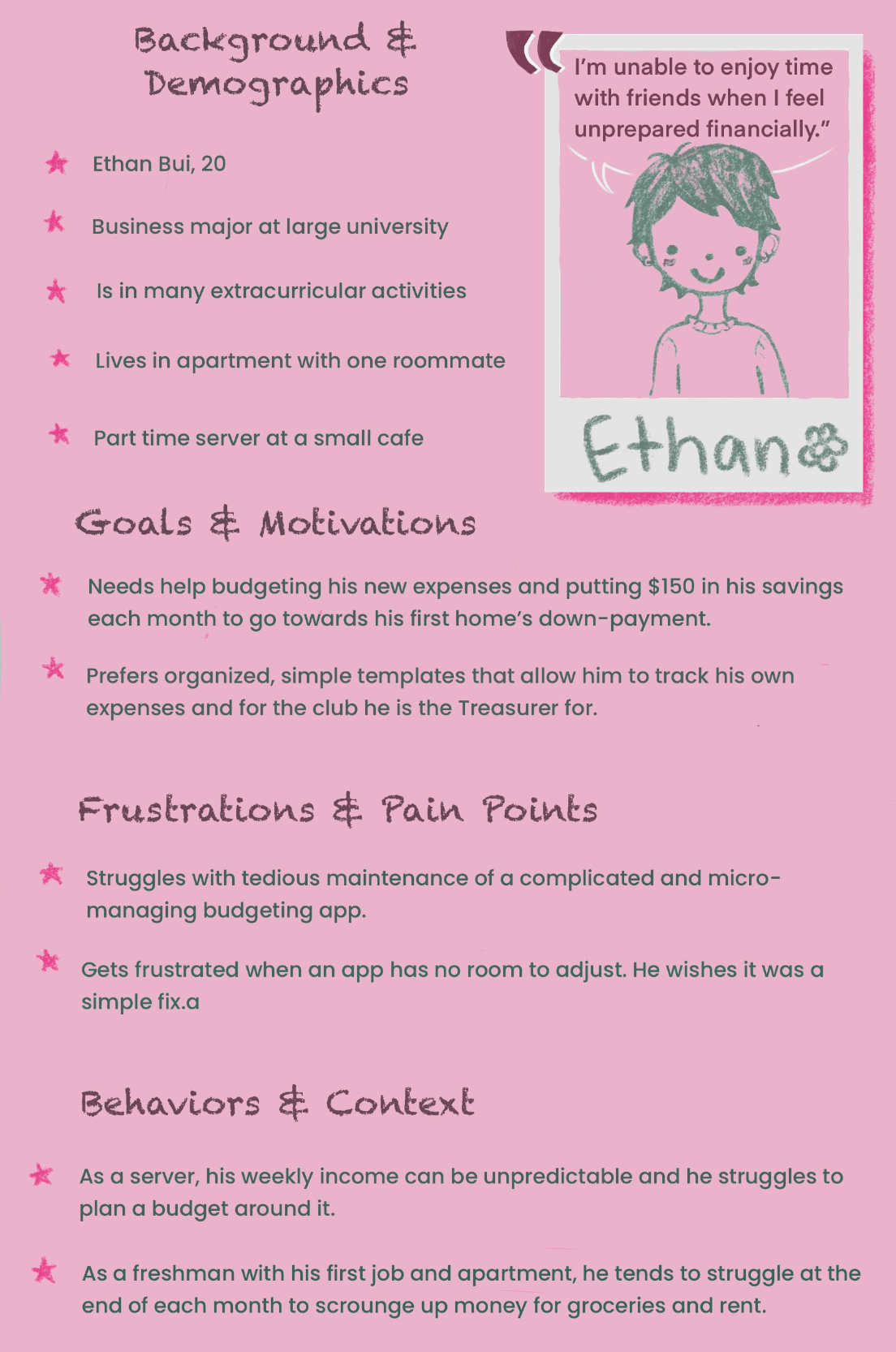
“I’m unable to enjoy time with friends when I feel unprepared financially.”

Ethan Bui

Project Persona

Context, Problem Framing, and Research Signal

Context and Framing

I'm designing a low-friction financial tool for students who are already going through mental fatigue. The point is not to build a job searching app, give financial advice, or act as a banking account app. It is strategically a tool to help employed undergraduate college students who have difficulty saving or delegating their money due to poor budgeting and/or lack of confidence. My inital understanding was that this demographic of students need an assistive app to show a single dashboard that displays total monthly bills, remaining weekly budget, upcoming expenses and savings progress, all visible without scrolling and is readable in under 25 seconds.

Hands-On Research

The research I conducted consisted of me interviewing multiple other students after my UX Design Process (CTEC 3323) class. The key research questions included:

  • “Do you currently earn a regular stream of income?” - this acted as the filter to get to my target demographic
  • “Do you feel like you struggle with budgeting or financial confidence?” - this acted as the root question, where a student could answer yes or no and it told me what question to ask next.
  • “What are your primary emotions when dealing with financial tracking/budgeting apps?” - this told me what the specific problems there were to fix.
  • “What are your financial goals for the near future, such as within 2 years?” - this helped me to get a scope of what real-life goals young college students have, and how I could realistically get them there.

Problem Statement

“How might we design a high-density budgeting dashboard that gives employed

undergraduate students a complete financial snapshot in under 25 seconds to help them

hit their $150-$200 monthly savings goal?

​

Persona

Ethan Bui

As a busy college student who is starting to gain his footing as an independent, he knows he needs an intuitive app that will make it easier for him to track his finances. Being a server with an irregular income makes it a bit difficult for a typical financial tracking app to be flexible enough to budget weekly.

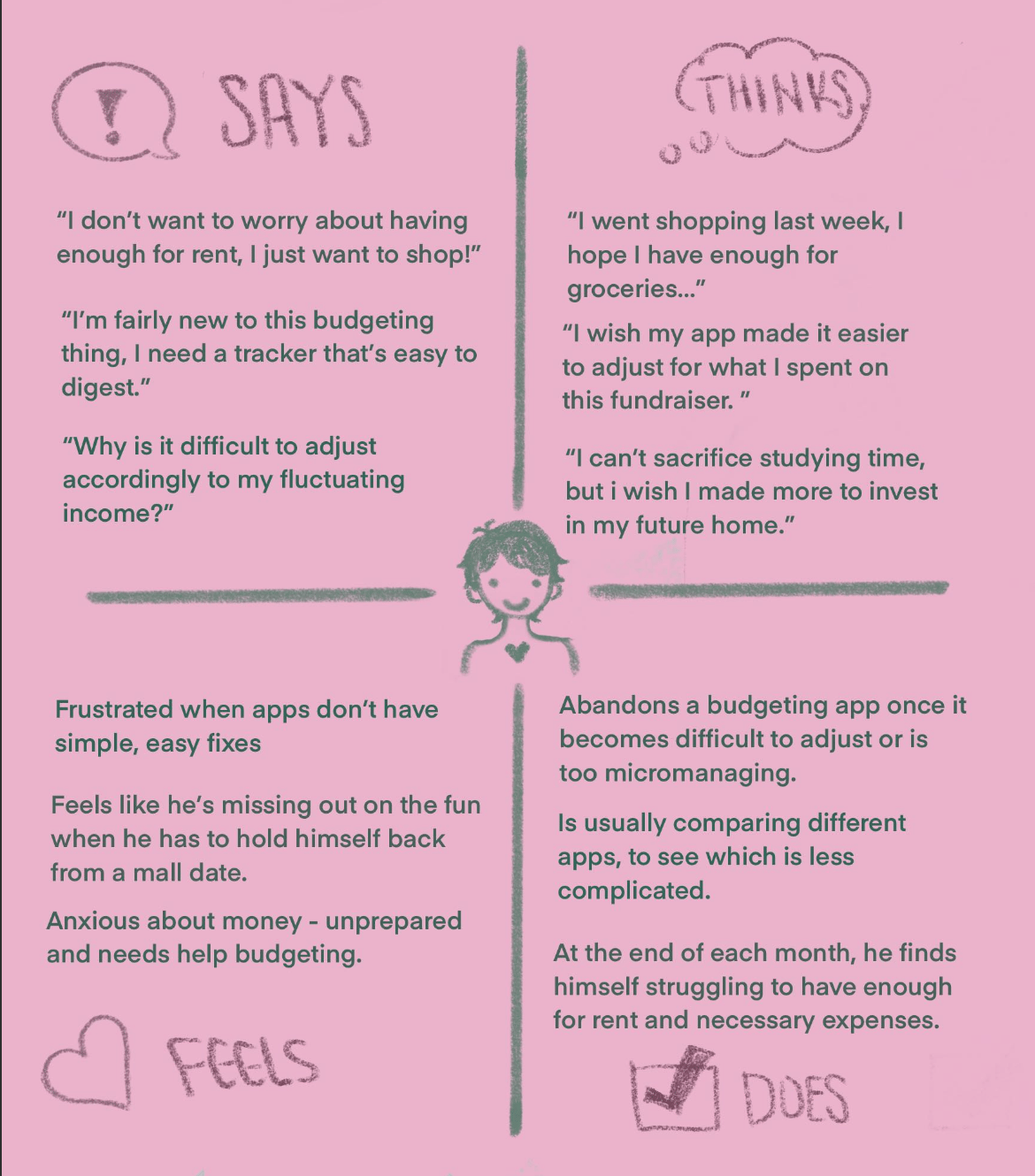
Empathy Map

Importance

It is important to gain insight into what a realistic college student may be going through and what they want to accomplish. I wanted the app I was designing to be flexible enough to adjust the income and categories for a college student who’s routine may change every few months. Listening to the frustrations, behaviors and goals of my persona will help me zero in on what I want to come out of my app.

Early Structure

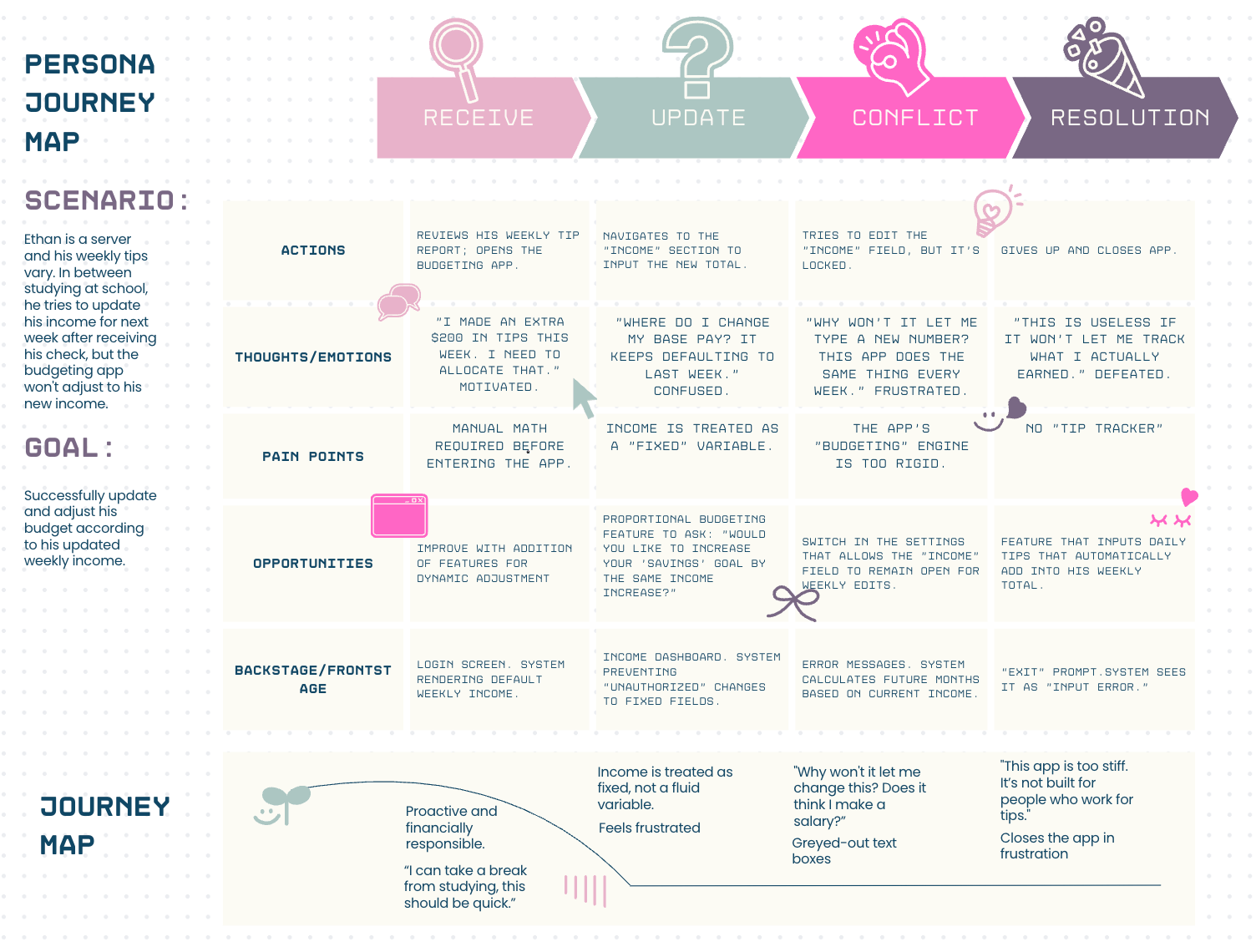
Journey Map

I mapped the experience of Ethan, a student-server whose income fluctuates weekly. This exercise revealed a major gap in the market: most budgeting apps are built for salaried professionals, not the unpredictable reality of a working student.

Ethan’s "defeated" state at the end of his journey wasn't caused by a lack of money, but by system rigidity. The app’s inability to handle fluid income created a "cognitive wall" that led to total abandonment. This insight shifted my focus. I moved away from building a standard "ledger" and toward a dynamic dashboard that prioritizes quick, manual adjustments over rigid, automated cycles.

Information Architecture / Site Map

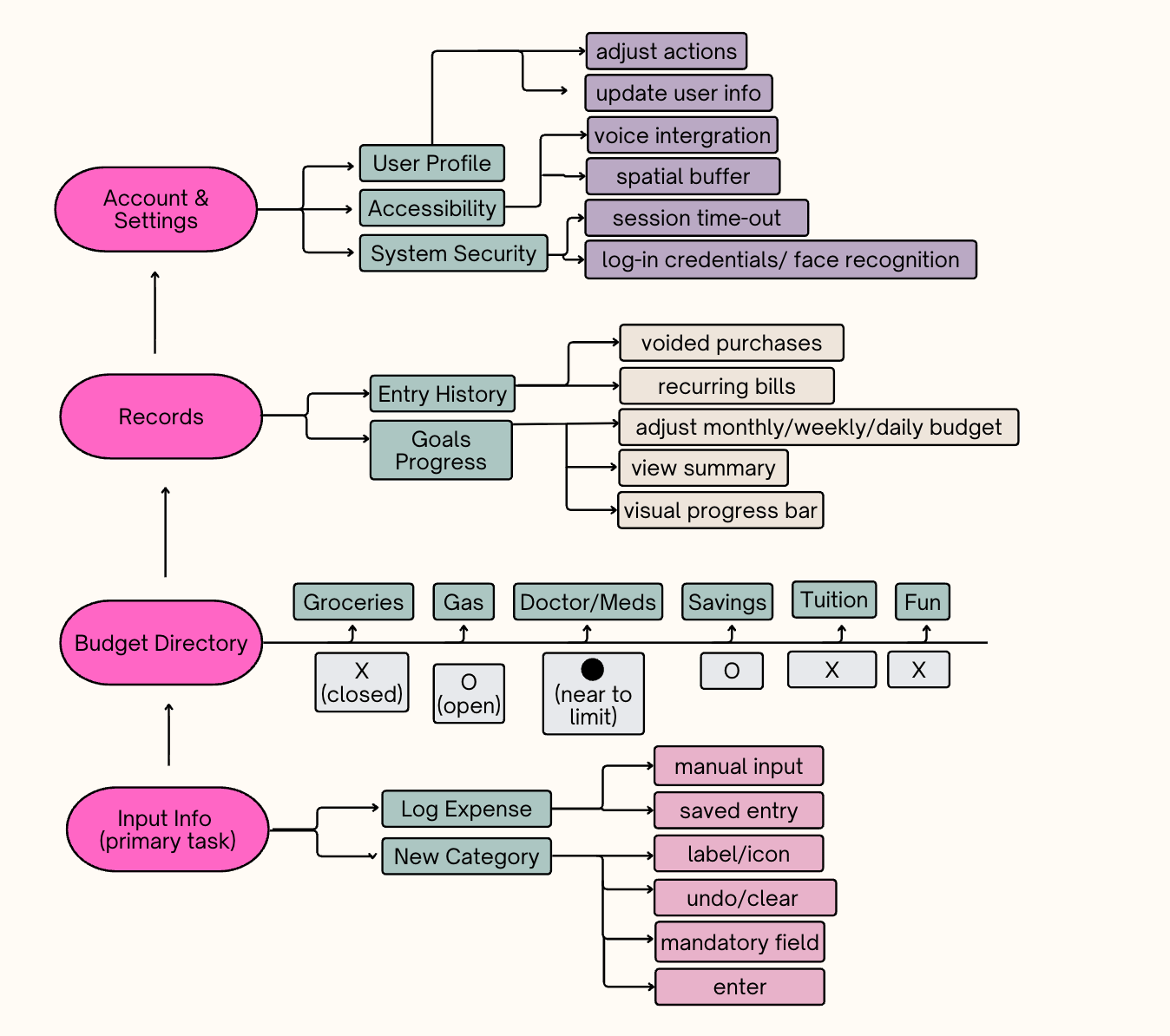
My early information architecture started with three main “navigation” categories: Account & Settings, Records, and Budget Directory, with Input Info being the main action. Account & Settings housed the User Profile, Accessibility functions, and System Security, within it having two more specific actions. Under Records, there is Entry History and Goals Progress which each housed different statements and summaries to “view”. I have one action, “adjust budget”, which I later didn’t believe was a good fit under this category. Under Budget Directory, was the main ‘”check-in” where I initially wanted the user to see how each of their budget categories would present the state they were in. This was an early concept I had which showed X for closed, O for open, and closed O for near to limit. Input Info was the primary task where I showed what information would fall under this category. Although this structure ended up changing, it was just the beginning of getting to my final flows and structures.

Rationale for what I chose

As shown in my Information Architecture and Site Map, I had an idea to have three main categories (listed) which I later changed. I knew that having a main navigation, however, would be critical to the goals of a busy student, since they do not have time to be searching through different labels and need a clear directory to get to the desired information and/or complete main task. Although the names and number of categories ended up changing, the rationale stayed the same. For my early concept under my “Budget Directory” also ended up changing, but the idea was to have the user take a quick glance and know exactly where they stood in their financial health without having to go search for buried information. These status updates would later lose this X’s and O’s system, but the idea stayed the same. Ultimately, I wanted the user to have confidence in navigating the app.

The Messy Middle

Low-Fidelity Wireframe

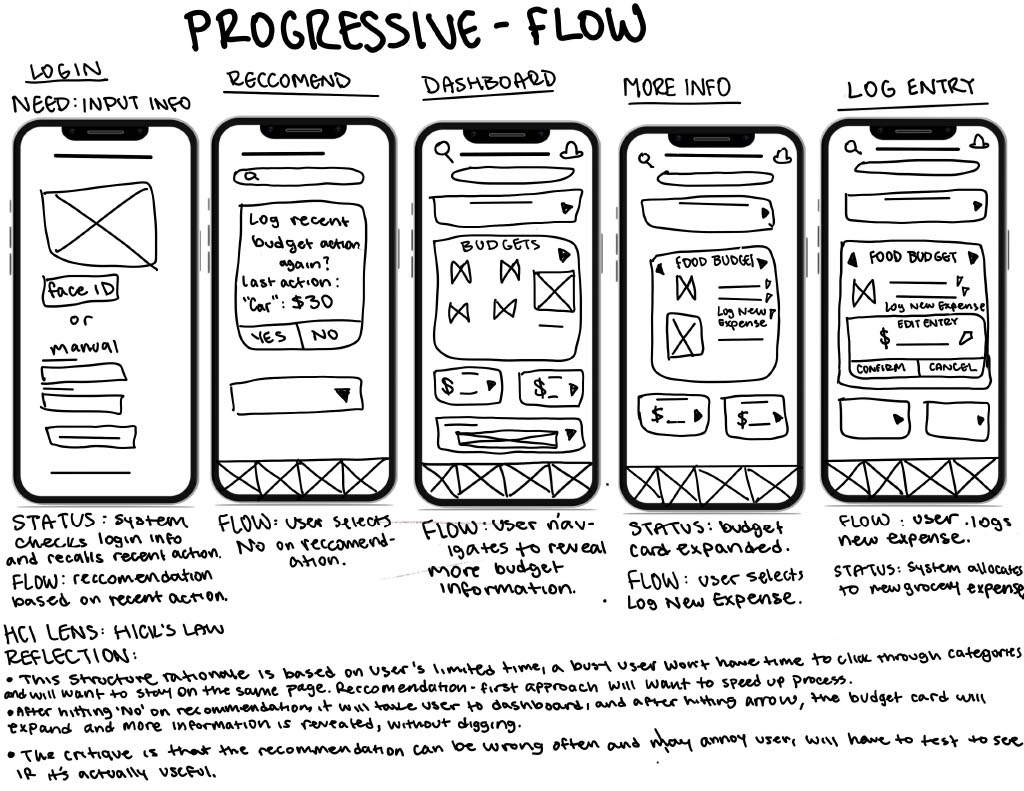
Based on initial journey map and site-map thinking, I came up with a few concept sketches based on different methods, including the prediction-first model. This led me to create a set of wireframes, like the one shown above, to show the direction I started to go when going from my “X’s and O’s” concept to my updated, card-based dashboard interface. This flow demonstrates the user logging in as the system checks for their most recent actions, and asks if the user would like to jump straight into doing the same action. The user selects “No” and navigates to the Food icon in the Budget card on the Overview (dashboard) page. Directly on the same page, the user can reveal more information (progressive disclosure) and quickly complete their desired action, which is to log a new expense, if they are in a hurry. The user confirms their new entry and the system allocates to this update.

Component System

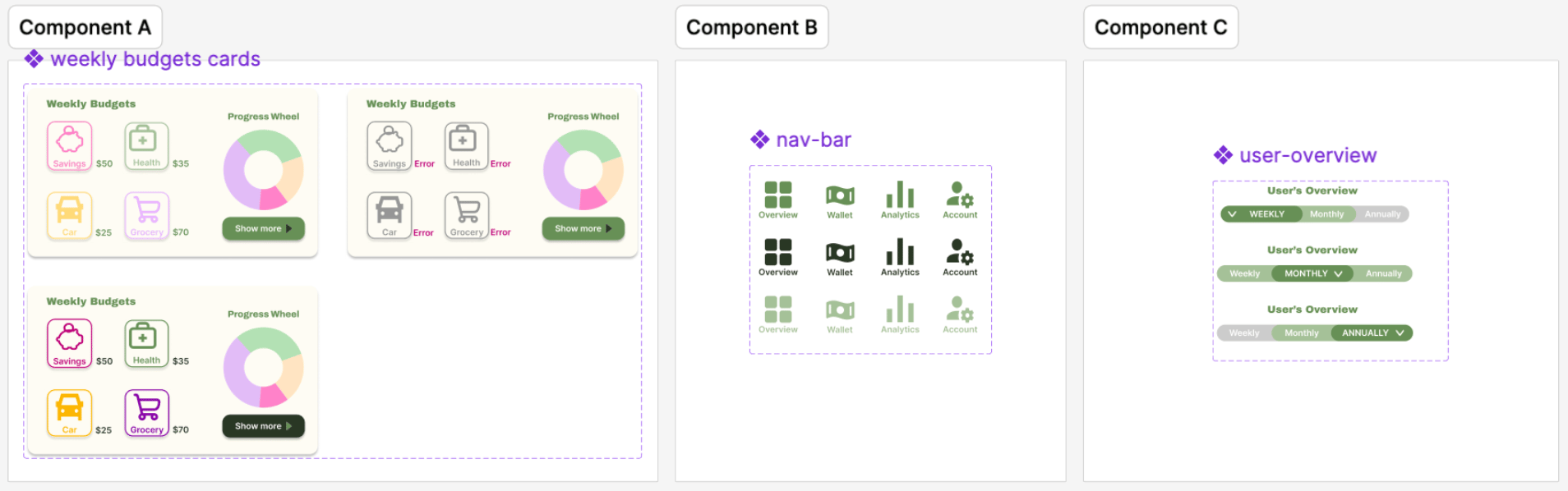
I believe that by creating a colorful interface by strategically assigning certain categories to their respective color, it would help users with recognition, and therefore less thinking. When they see a graph such as a progress wheel they are able to know generally what they’re looking at without searching for more information. This is the system I wanted to set up starting with four common budgeting categories: Savings, Car, Food and Health. Similarly, I wanted to set a system for the user to recognize regarding the states of buttons, differing in shades of green- darkest green for active, dark green for neutral, light green for hover, and gray as both neutral and disabled. Furthermore, I created many more component systems for the colors, fonts, spacing and more icons (such as the search button) to keep a cohesive and consistent design.

High-Fidelity Screen 1

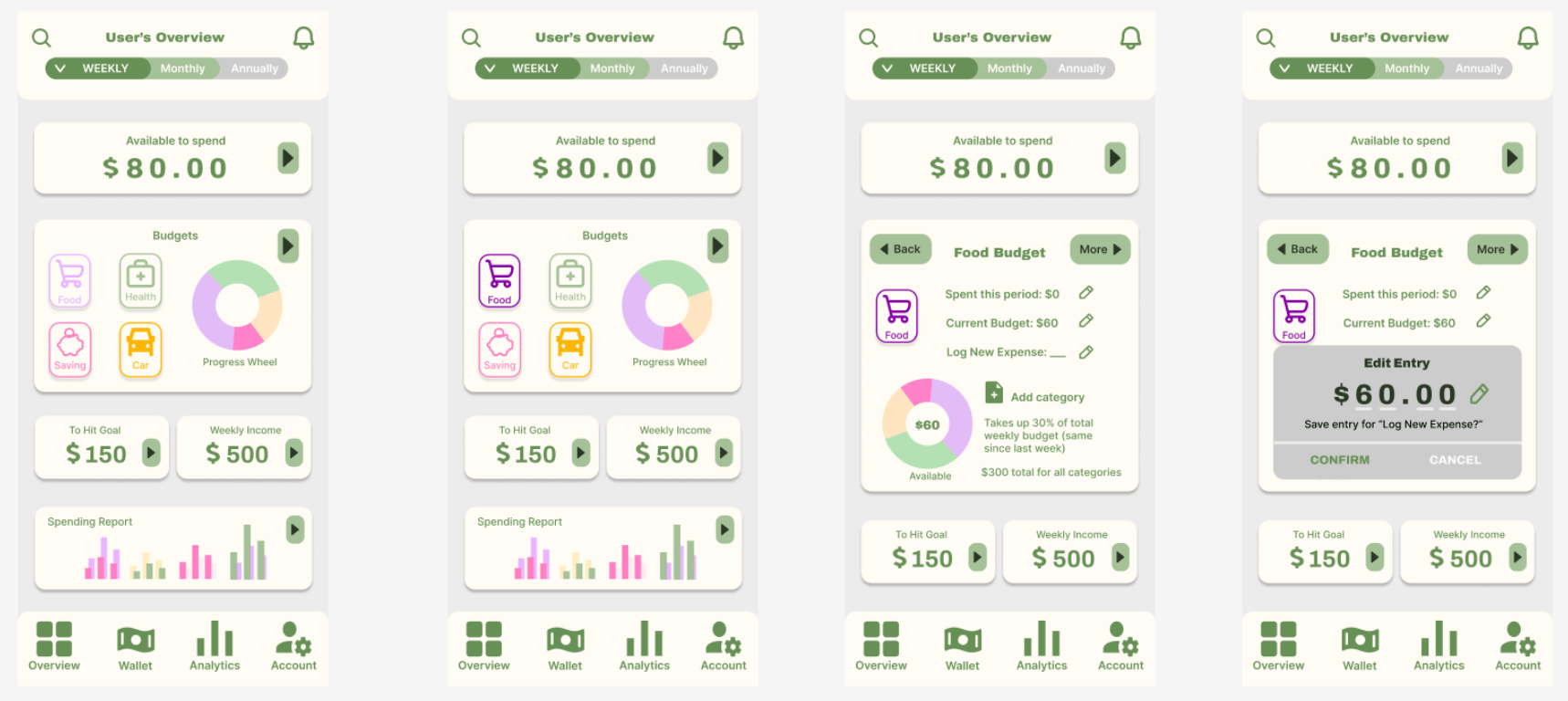
This page is directly based off the Low-Fidelity Wireframe from before. The card system was designed to be an interactive and general overview of the information a user may be initially looking for when logging onto the app. The purpose is to minimize the searching or clicking for the user, and certain actions can be done on the same overview page. In this case, the user is trying to log a new Food expense within the Budgets card. They will select the interactive Food button which will expand the card, revealing more information and actions. The user selects “Log New Expense” from which they receive a pop-up prompting them to enter their new entry using the pencil icon, and from there they will either confirm or cancel.

Structural Revisions

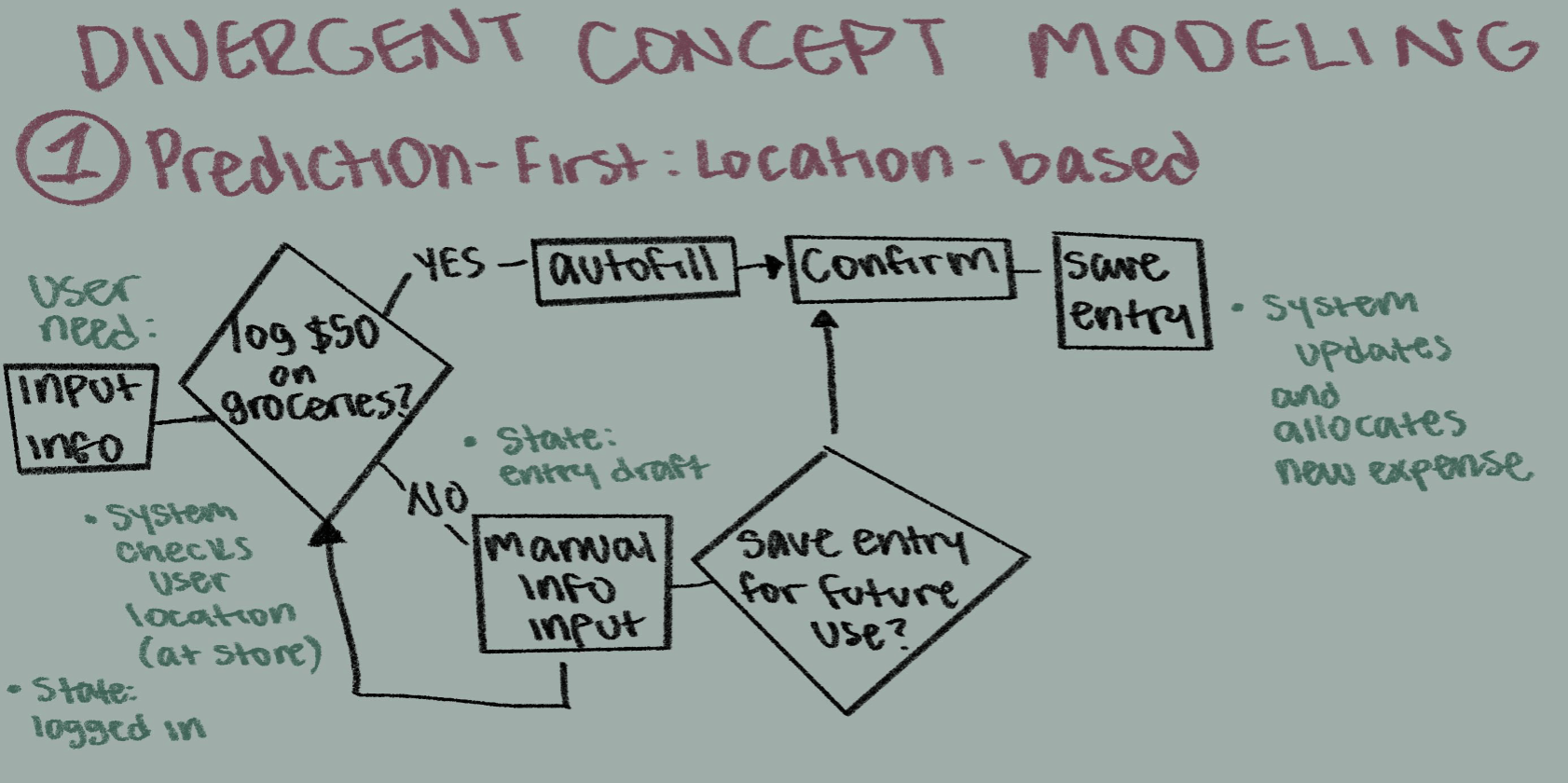
The biggest structural revisions I made from my original chosen concepts, like the concept model shown below, would be taking away the prediction-first node right after logging in, and replacing the X’s and O’s system with budget cards for a clearer, more interactive view of different kinds of information. As listed in the annotations for my low-fidelity wireframe, my structure is based on a user who is on limited time and may have multiple differing expenses they will want to log, so a recommendation/prediction may just take up more time in their process. In a different prediction-first model, I would have moved the node after the user selects the “log new expense” from there, which is where a recommendation/prediction may be more relevant. I believe that the budgets cards system would benefit the user more.

The Messy Middle

High Fidelity Screens 2

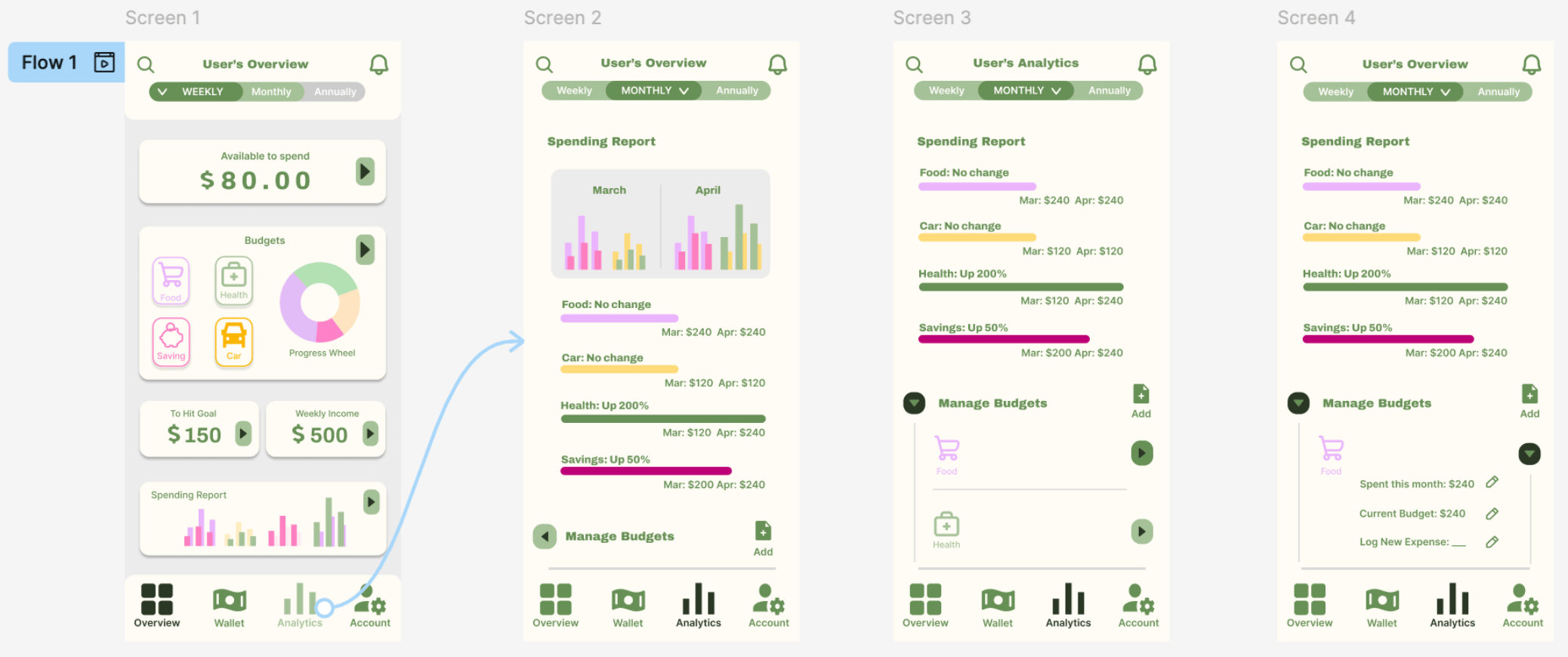
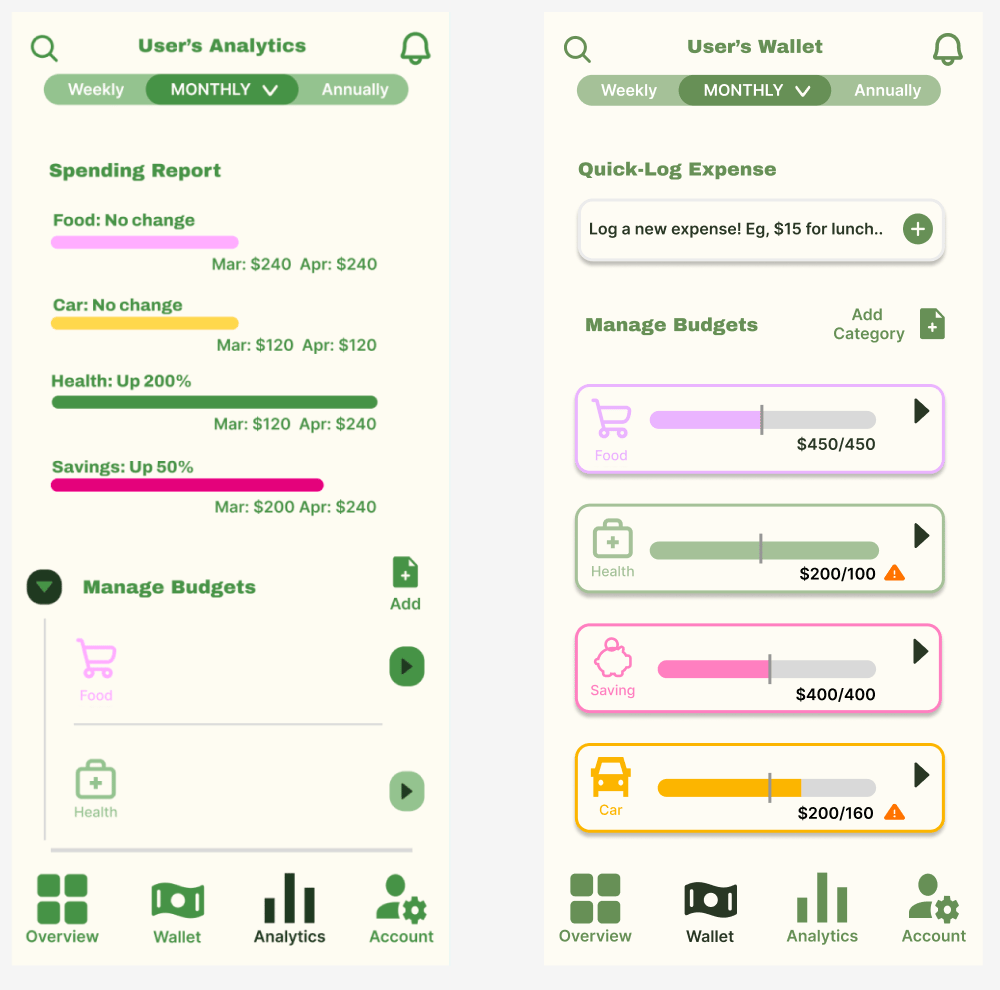
For this second flow, I am simulating the user navigating from the Overview page to the Analytics page using the nav bar to get to the food budgets category for more information. I later realized that this particular flow required much revision, but my initial thinking was that both static reports and actionable budgets tabs would be housed under the Analytics page, where the user would have to go through a series of clicking events to expand more and more information under the Manage Budgets part of the page. The spending report is shown as a bar graph with a more detailed breakdown directly underneath it. The following section would be the Manage Budgets area where a user can find more information regarding their budgets categories. I will eventually recognize that my initial Information Architecture and visual design was a bit illogical, revealed in this flow.

Prototype Logic

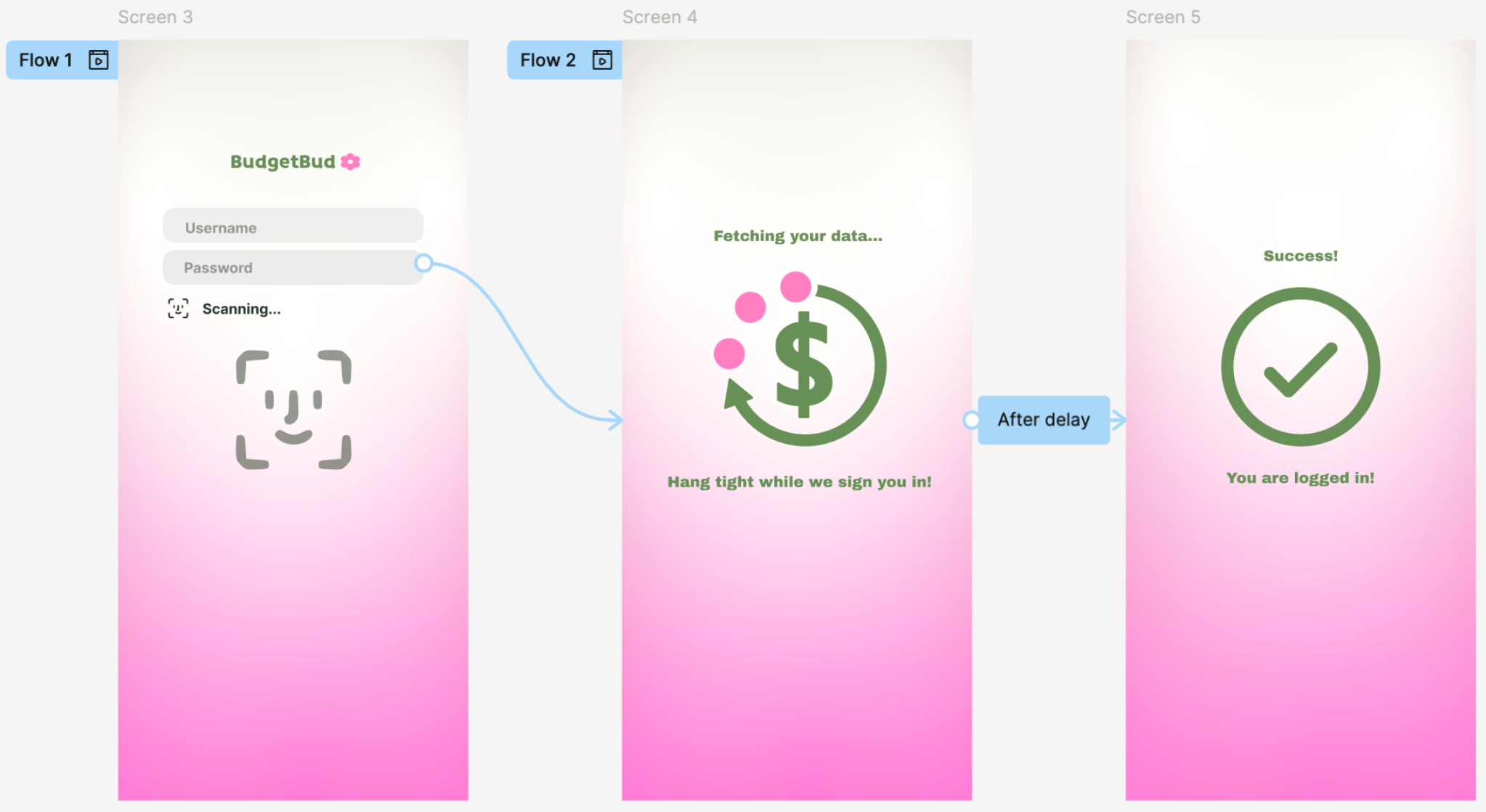
In this login sequence, I took into consideration that "password fatigue" is a common barrier for stressed/busy students. Initially, I designed a traditional manual login, but I revised this direction after realizing that requiring a high-cognitive task (remembering credentials) before even entering the app was discouraging user engagement. The current prototype logic uses triggers to bypass manual entry, transitioning into a purposeful "After Delay" loading state. I intentionally included this "Fetching data" screen to provide system status visibility. I included a micro-interaction of the loading spinner to communicate to an overwhelmed user, that this pause just confirms that the app is working hard for them rather. It then will flash the large green check-mark, to give the user confidence that their login attempt worked and will now transfer them smoothly to their dashboard.

Key Changes

The evolution of this project was defined by a shift from predictive automation to user-directed flexibility. I realized that my initial "X’s and O’s" concept was too static, and paired with a prediction-first model that prompted users with suggested actions immediately upon login may just be adding to their cognitive load. I pivoted away from this after realizing that for a student on limited time, a "forced" recommendation can become a hurdle rather than a shortcut. I replaced this with a dynamic card-based dashboard that utilizes progressive disclosure. This allows users to see a high-level overview of their "big four" categories (Savings, Car, Food, Health) and log an expense directly from the home screen without navigating deep into sub-menus.

Evaluations and Iteration

These findings are results of research I conducted which involved five people going through each flow with me asking questions related to different methods:

Heuristic: examines the interface against established usability principles called heuristics.

First-Click: tracking where a user clicks first to complete a task to see if the page's layout and navigation are intuitive.

and Cognitive Walkthrough: seeing the perspective of a new user to see how easy it is to learn the system.

Major Finding 1

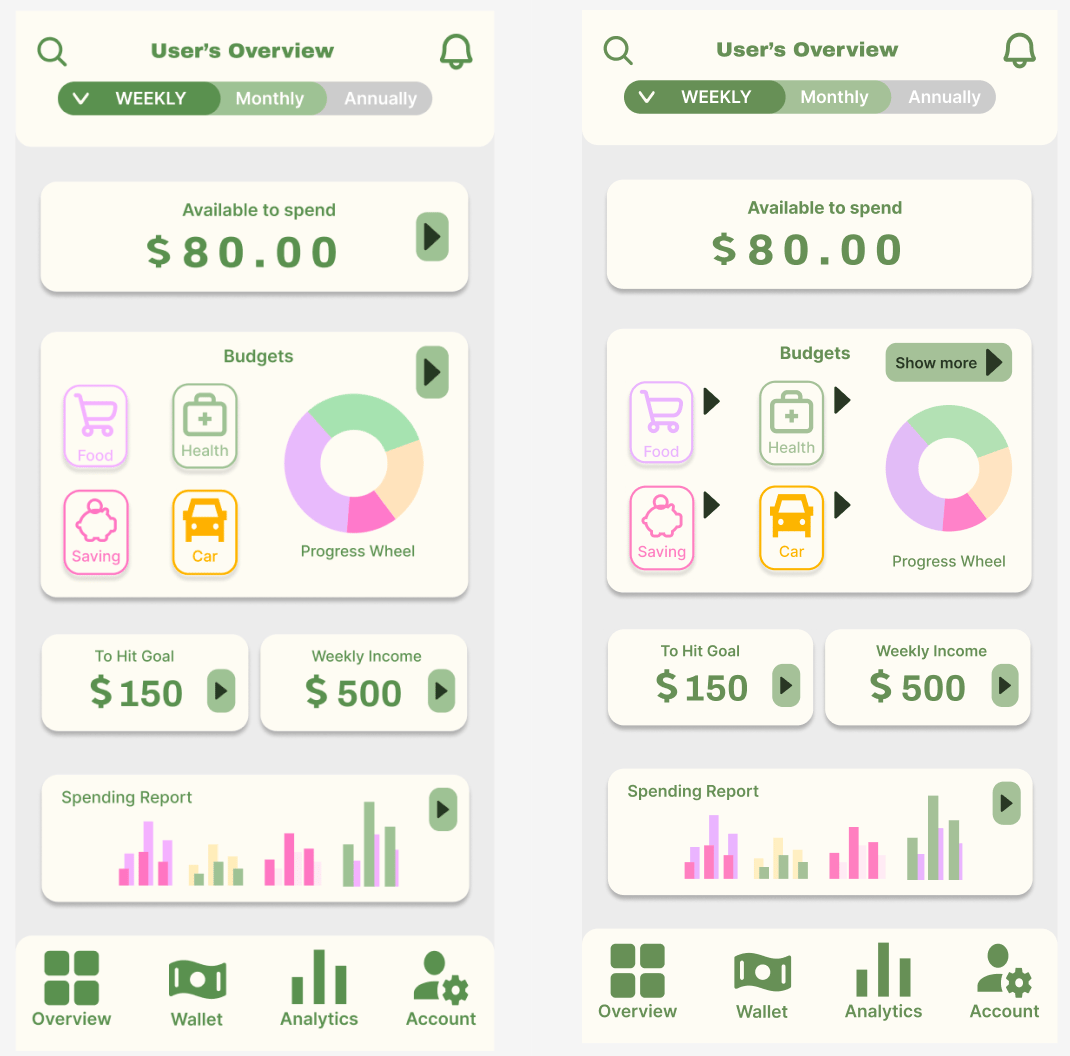
In my research, multiple users assumed the arrows executed the same action all throughout when actually, some act as drop-down and others will take you to another part of the app. The user also tried to click the “Show More” button to log their expense but was taken to the full budget section on a separate page (Analytics) instead of selecting the Food button to

do the same action without being redirected anywhere. I found that adding an arrow to every card confused the user on the task itself or purpose of the card. The method that revealed this was the Heuristic method, it showed that the clarity and consistency heuristics were being violated.

The Change

To improve the Heuristic of clarity and consistency, I thought that by adding certain arrows and removing others, it would take care of the confusion and uncertainty of the user trying to get to the most completed action, logging new expenses in the shortest possible way (all within the Overview page).

I specifically took off the arrow next to “Available to Spend” because I found that for many of my participants it was not intuitive enough to click on the category buttons in the budgets card. I believe this improves the clarity because it tells the user that the dark arrow with the green background will take them elsewhere, and the simple dark arrow will act more as a trigger for a drop down menu within the same page.

This is important because it the user will not trust the system of an app if it is inconsistent.

Major Finding 2

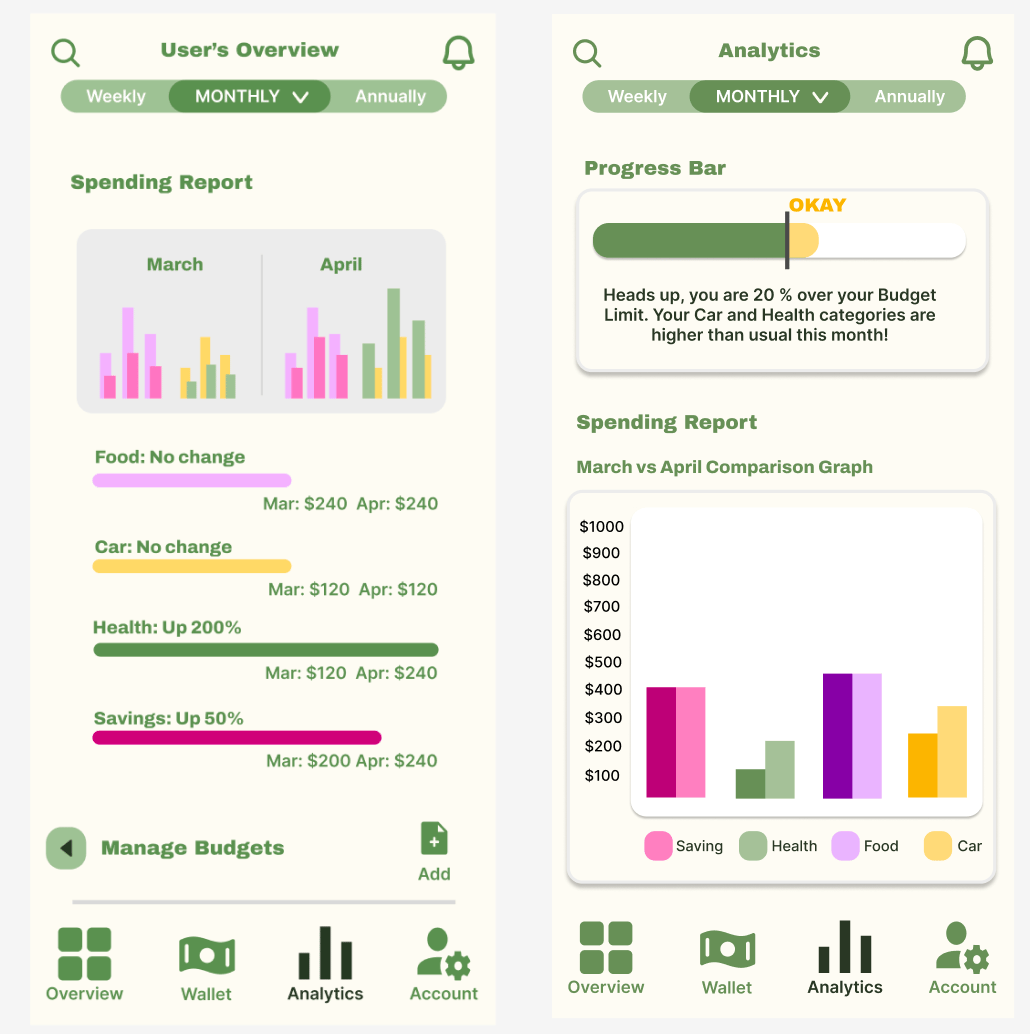
In attempt to view more details on the Food budget category, multiple users went to the Analytics page and clicked on a non-interactive Food bar under the Spending Report graph. It was the first thing the participant saw on the Analytics page and it serves simply as informational text but still, the user did not understand the graph, so the user was looking for more information. The method that revealed this was the first-click test.

​

The Change

Based from these findings, I made changes to the graph and details structure so that that they’re much clearer in communicating what is going on to the user. The information architecture is also improved because it is strictly information based under Analytics, as is implied under the name (nothing action based). To specifically reduce user confusion on what the purpose of the Analytics page may be, I have restructured the graph I had before and converted it into a comparison graph. I have also added a Progress bar to the top of the page so the user knows within 3 seconds how they’re doing in terms of their budget limit (it will tell them how much they are over budget and where they overspent). To change the information architecture on where the “Manage Budgets” area is, I have removed it from the Analytics page to the Wallet page, as my participants have suggested this change.

This is important because improving the design will lead to less clicking, searching, and confusion by the user.

Major Finding 3

Users tried looking for the “manage budgets” section through the Wallet category first, when it is actually under the Analytics category. The information architecture is off since the “manage budgets” area being under Analytics is not intuitive enough for the user and led to much more clicking and searching. The method that revealed this was the Cognitive Walkthrough. When I asked the user to guide me through their thinking, they told me that clicking through all the hidden information to find what they’re looking for was “too much effort”, so this helped me in my redesigning process, as well.

The Change

To reduce user confusion and improve the information architecture on where the “Manage Budgets” area is, I have removed it from the Analytics page to the Wallet page, as my participants have suggested this change. I also changed the long process of going through multiple drop-down menus to ultimately get to the action the user may want to just complete quickly, which is logging a new expense. Having this in mind, I created a card under Quick-Log Expense at the top of the page with a Plus icon so the user can quickly access it as needed. Further down the page, I added each category as a card so the user can get a quick glance on how they’re doing for the specific category (which are also drop down menus). Finally, I clarified the “add category” button so as to not be confused with the “log new expense” button.

These changes matter because they reduce cognitive load for the users as they can receive information and log new information at ease.

Why Does it Matter?

These changes matter because as the designers, we are not our users. We can’t say we are good designers if we are creating apps without real research using outside perspectives. I may might think a button is obvious, but a stressed student might find it invisible. Conducting my research through validation methods which revealed that I was "wrong," identifying why, and then fixing it proved to me that the first design will never be the last.

Reflection

Final Thoughts

This project transformed my understanding of UX from simply "solving a problem" to managing human energy. The most influential research insight was realizing that for an overwhelmed student, financial tracking isn't a math problem, it’s a cognitive one. This led to the major turning point of abandoning a rigid, "prediction-first" automation model in favor of a dynamic dashboard. While automation seemed modern, I realized that for users with fluid incomes like Ethan, more control and flexibility actually reduces anxiety. The constraint that mattered most was not the automation, such as the system jumping at guessing the next step or the correct solution, but keeping myself in the user’s shoes to satisfy their needs. This helped to broaden my perspective outside of my own opinions and helped me understand the purpose and importance of research.

What’s next?

Moving forward, I would like to further refine the accessibility features, specifically exploring how voice-to-text integration could lower the barrier for entry even further during high-stress periods. Ultimately, this project demonstrates my identity as a disciplined, empathetic designer who isn't afraid to kill a "clever" idea if it serves the user's actual needs. It proves that I value clarity over complexity and that I possess the professional maturity to let user evidence, rather than personal ego, dictate the final design.

“Good design is obvious.

Great design is transparent.”

Joe Sparano

Graphic Designer & Educator